Your bank balance is real, but it is not the number you can safely spend.
Some of that money already belongs to rent. Some belongs to utilities, debt payments, subscriptions, groceries, or the savings you promised yourself you would finally protect. Your banking app puts all of it in one pile and leaves you to remember what is already spoken for.
That is the problem Depo is built to solve.
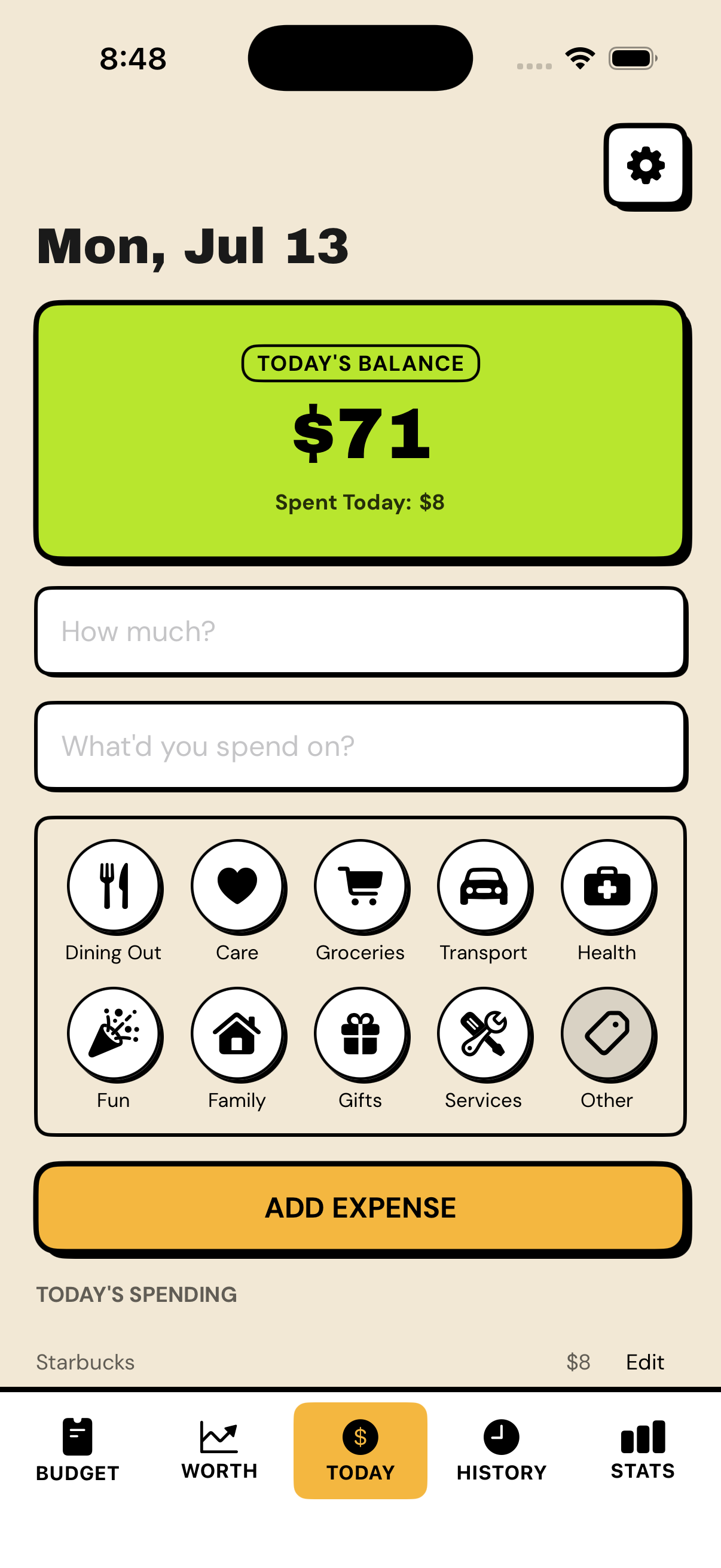
Depo takes the money coming in, removes essentials and savings, and turns what remains into one clear number: what you can safely spend today.
You do not need to build a spreadsheet, assign a limit to every part of your personality, or connect your bank account. You set up the month, check one number, record what you spend, and move on.
This guide explains the whole approach, how to use Depo day to day, and how every part of the app can help you spend more deliberately, save more consistently, and understand where you actually stand.
Depo in 30 seconds
- Enter your income for the month.
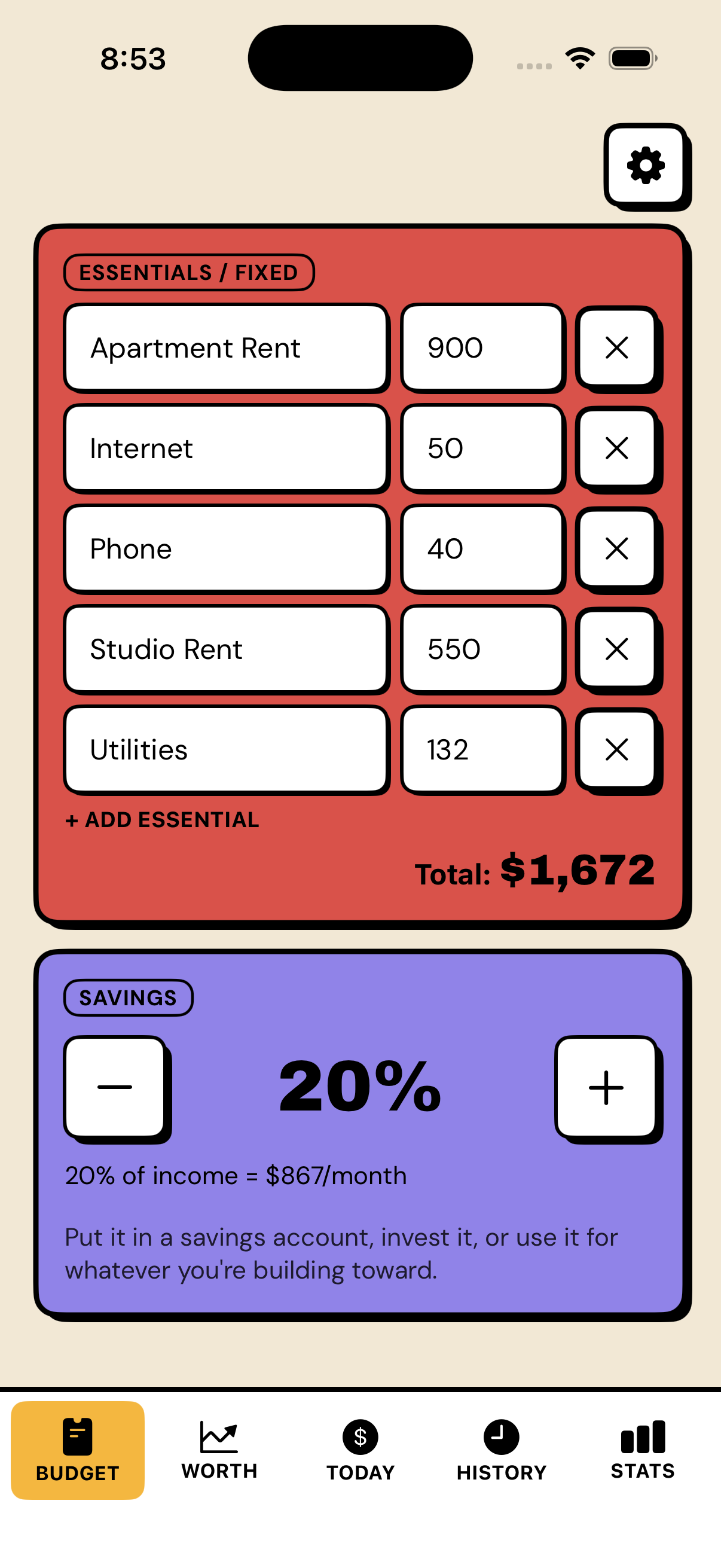
- Enter your essentials — rent, bills, debt payments, anything already spoken for.
- Enter your savings target — protected before flexible spending begins.
- Depo divides what is left by the days remaining and shows one number: what you can safely spend today.
- Check that number before optional spending. Log what you spend. Tomorrow adjusts automatically.
That is the whole system. Everything below is the detail behind it.
The idea behind Depo
Traditional budgeting usually starts with categories: decide how much should go to groceries, restaurants, clothes, entertainment, and everything else. Then spend the month trying to make real life match the plan.
Depo starts with a more immediate question:
After everything important is covered, what can I safely spend today?
The calculation is simple:
Income − essentials − savings = flexible money
Depo spreads that flexible money across the days remaining in the month. The result is your safe-to-spend number for today.
For example:
- Income: $4,200
- Essentials: $2,400
- Savings: $400
- Flexible money left: $1,400
- Days remaining: 22
- Safe to spend today: $64
That $64 is not a punishment or a strict daily allowance. It is a current picture of what is safe after your important commitments are protected.
Spend $40 today and the unused amount carries forward. Spend $90 and the next days adjust. Nothing resets because you had an expensive Tuesday, and the app does not act disappointed in you. It simply updates the math.
Want to see your number? Set up your month in a few minutes. No bank login required. Download Depo on the App Store.
Why your bank balance is the wrong number
Suppose you open your bank account and see $3,200. It is easy to feel temporarily rich.
But if $1,600 is needed for rent and bills, $300 is reserved for debt payments, and $300 is meant for savings, only $1,000 is genuinely flexible. If there are 20 days left in the month, the useful number is not $3,200.
It is $50 today.
Your bank balance answers, "How much money is currently in this account?" Depo answers, "How much of that money is actually available for today without interfering with the rest of the month?"
That difference is the entire point. If you want to understand why in more detail, why your bank balance is not your spending money breaks it down further.
Why Depo uses whole numbers and never shows cents
Depo intentionally uses whole numbers everywhere.
- $0.56 becomes $1
- $1.37 becomes $1
- $18.72 becomes $19
This is not an unfinished accounting feature. It is a product decision.
Depo is a tool for making everyday spending decisions, not reconciling a corporate ledger. Knowing that you can safely spend $43 today is useful. Seeing $43.27 usually is not. The cents add visual noise and a sense of precision without changing whether dinner, groceries, or a concert ticket fits your situation.
Whole numbers make amounts faster to enter, totals easier to read, and the daily number easier to remember. They keep the app focused on the decision that matters rather than the decimal places that do not.
When you record a purchase, round it normally to the nearest whole unit. The goal is an honest, usable picture of your money—not a statement that matches your bank down to the cent.
How to set up your first month
Depo becomes useful when the numbers you give it reflect your real life. Setup does not need to be perfect, but it does need to be honest.
1. Add your income
Start with the money you expect to have available during the month.
Use take-home income rather than the number before taxes. Include regular paychecks and other income you can reasonably rely on. If your income changes from week to week, start conservatively and add money when it actually arrives instead of budgeting income that may never appear.
This makes Depo especially useful for freelancers, gig workers, service workers, and anyone with changing hours. The plan does not depend on pretending every month will look the same. It works from what is real now. For a deeper look, see budgeting with irregular income.
2. Add your essentials
Essentials are amounts that are already spoken for. Common examples include:
- Rent or mortgage
- Utilities
- Insurance
- Phone and internet
- Basic transportation
- Essential groceries
- Minimum debt payments
- Childcare
- Required subscriptions or recurring costs
A useful test is: Would I still have to pay this if I stopped all optional spending tomorrow?
If the answer is yes, it belongs with your essentials. Protecting these amounts first prevents you from accidentally spending bill money just because it is still visible in your bank account. For more on drawing the line, see what counts as an essential expense.
3. Add savings
Next, enter what you want to protect for the future.
This can be money for an emergency buffer, a planned purchase, a general savings goal, investing, or an extra debt payment. Depo removes it from flexible spending before calculating your daily number.
That order matters. Saving "whatever is left at the end of the month" often means saving nothing. In Depo, savings are given a job before optional spending begins.
Choose a realistic number. A smaller amount you can actually protect is more useful than an ambitious goal that makes the rest of the month impossible.
4. Look at your safe-to-spend number
Once income, essentials, and savings are in place, Depo shows what is safe to spend today.
This is the number to check before an optional purchase—not your checking balance and not a vague feeling that you have "probably been pretty good lately."
You are not required to spend it all. You are not required to spend the same amount every day. It is simply the current amount that fits the plan.
How to use the Today screen
The Today screen is the center of Depo. It gives you the number you came for without turning the home screen into a financial cockpit.
Open the app before a purchase and check the safe-to-spend amount. That quick check changes the question from "I hope this is fine" to "I know what this choice does to the rest of the month."
Then record what you spend.
Adding an expense is designed to take only a few seconds:
- Enter the rounded amount.
- Add a short name for the purchase.
- Choose a category if it is useful, or leave it as Other.
- Add the expense.
There is no need to open a separate transaction screen or classify every coffee perfectly. Depo can remember purchases you have entered before, making familiar expenses even faster to log.
The moment you add spending, your number updates. You see the tradeoff while it is still meaningful instead of discovering it days later in an automated bank feed.
What happens when you spend less—or more
Your daily number is flexible because life is flexible.
If Depo says $60 and you spend $35, the unused money does not disappear. It stays available and gives you more breathing room on the days ahead.
If Depo says $60 and you spend $95, you have used $35 that otherwise belonged to future days. Depo spreads that difference across the time remaining and shows a new number tomorrow.
There is no broken streak, failed budget, or artificial reset. The app keeps working from reality.
This is important because an expensive day does not automatically mean an irresponsible month. Maybe you bought a birthday gift, filled the car with gas, or did a large grocery run. Depo lets cheap and expensive days coexist inside the same plan. For more on handling a day that goes over, see what to do when you overspend.
What a red or negative number means
A red number is not a verdict. It is information.
If your safe-to-spend amount becomes negative, your current income is not enough to cover the essentials, savings, and spending already entered for the time remaining.
That is uncomfortable, but finding out now is much better than finding out through an overdraft, a declined payment, or a credit card balance you did not intend to create.
When the number is negative, look at the plan:
- Pause optional spending where possible.
- Check whether an essential amount is wrong or counted twice.
- Reduce or postpone a flexible savings target if necessary.
- Adjust the timing of a bill if that is genuinely available to you.
- Add new income only when it is real.
Do not delete legitimate spending just to make the number green. The point is to understand the situation, not decorate it.
Use "Can I afford it?" before a bigger purchase
Some purchases are too large to judge against a single day.
That is what Can I afford it? is for. You can enter a purchase you are considering and see how it would affect your money before you make it.
Imagine you are considering a $240 concert ticket. Your current daily number is $67. The purchase may be possible, but it could reduce your safe-to-spend amount to $54 for the rest of the month. That is a much more useful answer than a generic yes or no.
The feature helps you see the tradeoff:
- Does the purchase still leave your essentials and savings protected?
- How much will your daily number change?
- Would waiting a few days make the purchase easier?
- Are you comfortable living with the lower number afterward?
Sometimes the answer will be yes. Depo is not built to stop you from enjoying your money. It is built to help you say yes without discovering the real cost later.
Use categories without turning budgeting into admin
Categories are available when they help, but they are not the foundation of the system.
You can label purchases so later you can understand how much went to food, transportation, entertainment, shopping, or another part of your life. This makes spending breakdowns useful without forcing you to create dozens of category budgets before you can begin.
If categorizing every small purchase makes you stop tracking altogether, use Other and keep going. A consistently updated daily number is more valuable than a beautifully categorized budget you abandon after four days.
Use History to understand what happened
History gives you a record of your spending and lets you look back through the month.
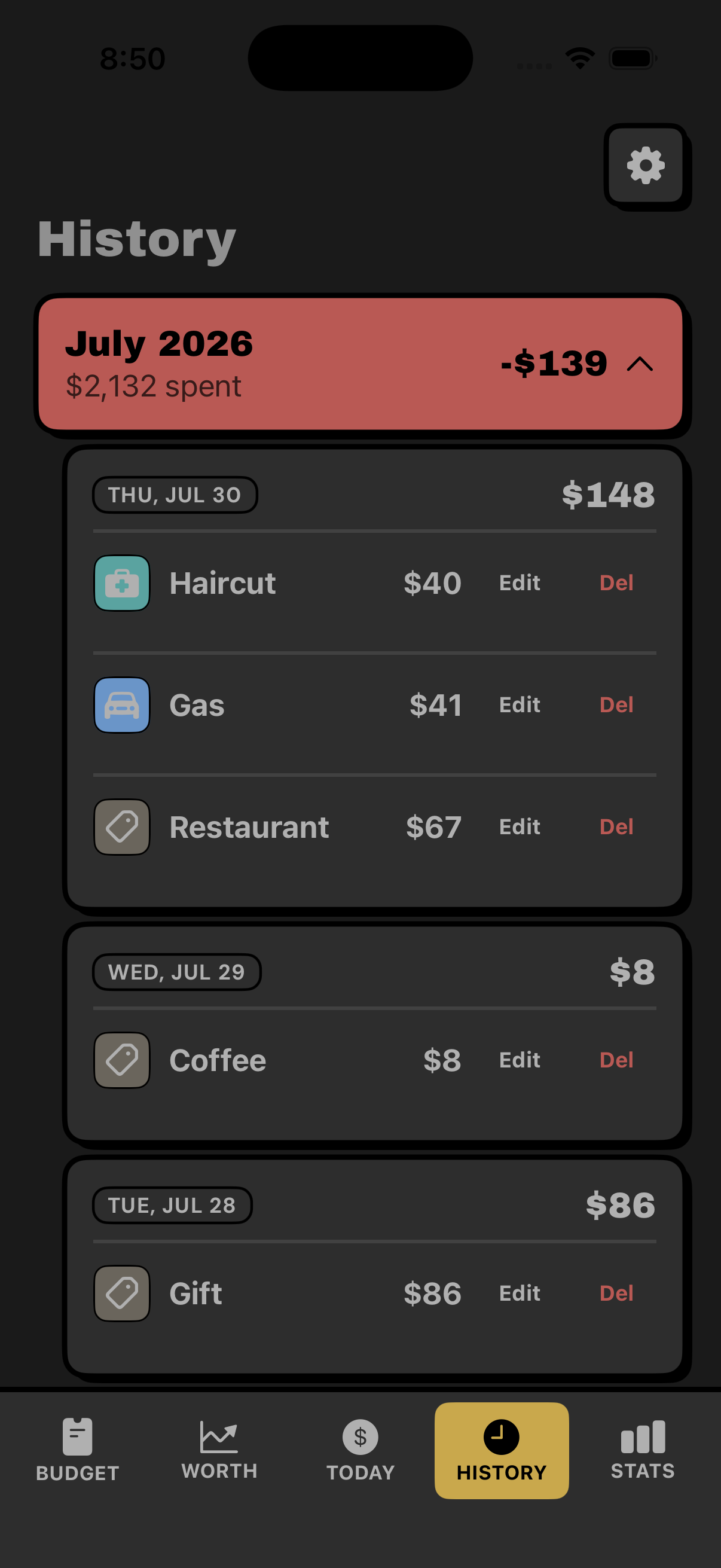
Use it to:
- Find a purchase you entered earlier
- Correct something that was entered incorrectly
- Notice recurring expenses you had stopped seeing
- Review a day or month that felt unusually expensive
- Understand where the money went without scrolling through unrelated bank activity
History is not there to prosecute you for a sandwich from three Thursdays ago. It gives context to the number you see today. With unlimited history, that context becomes more useful over time because you can look beyond the current month.
Use Stats and trends to see patterns
The daily number helps with the decision in front of you. Stats help you understand the pattern behind many decisions.
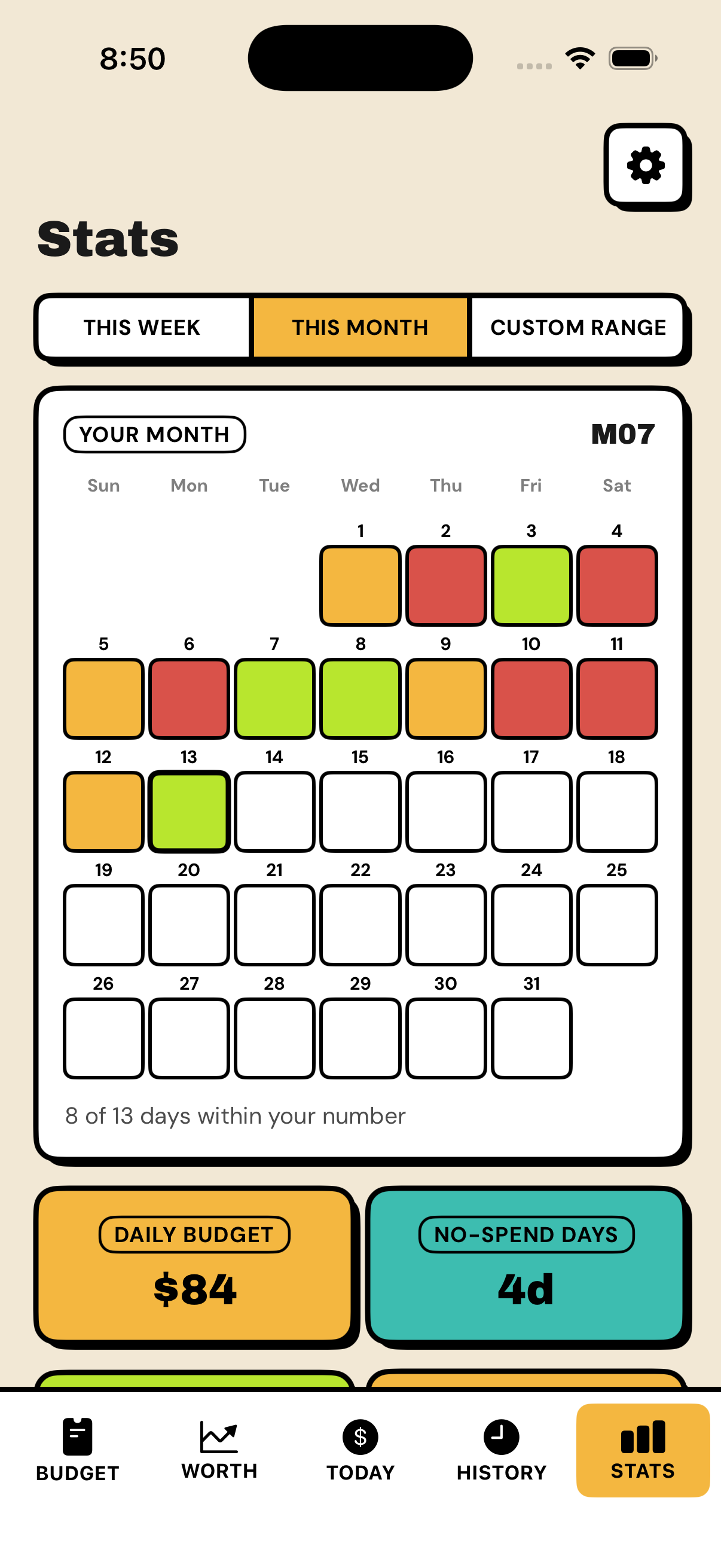
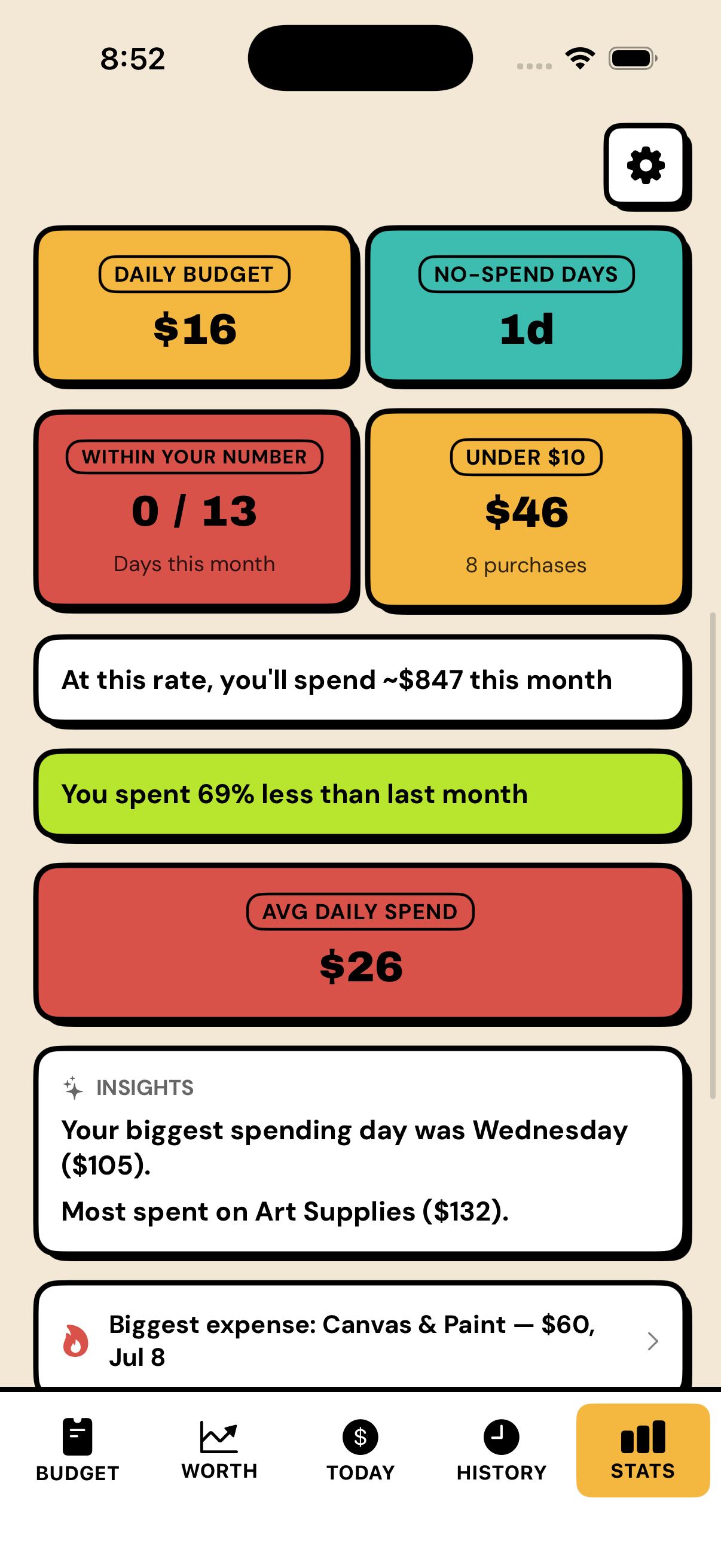
Depo can show spending trends and category breakdowns, along with useful signals such as average daily spending, days when you stayed within your number, and no-spend days.
These views can help answer questions such as:
- Is my daily spending increasing or decreasing?
- Which kinds of purchases take up the most space?
- Is this month genuinely unusual, or does it feel that way?
- How often am I staying within the number that fits my plan?
- Are no-spend days happening naturally, without turning them into a punishment?
Depo compares you with your own past rather than someone else's ideal financial life. Personal bests are based on your history. The useful question is not whether you spend like a stranger on the internet; it is whether your own situation is moving in the direction you want.
Read your Monthly Recap
At the end of the month, individual purchases become a story.
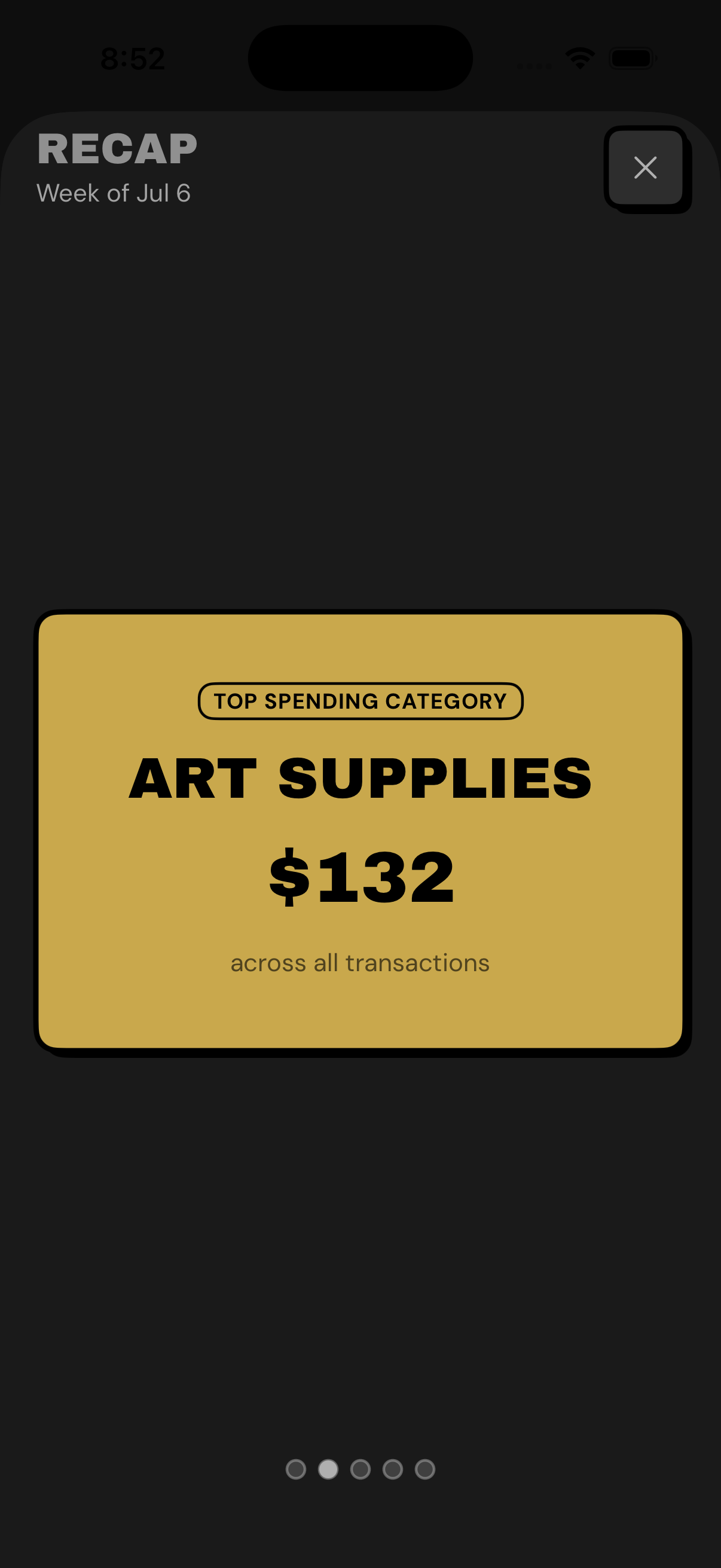
The Monthly Recap brings the important parts together so you can see what happened without manually assembling a report. It is a chance to notice what you spent, how consistently you stayed within your number, and what changed across the month.
Use the recap as feedback for the next setup:
- If the same essential is underestimated every month, update it.
- If one category is growing, decide whether that reflects your priorities or just went unnoticed.
- If the month worked well, reuse the structure instead of rebuilding everything.
- If it did not work, adjust the plan—not your opinion of yourself.
A recap should make the next month more realistic. It is not a report card.
Use Net Worth to see the wider picture
Safe to spend tells you what is possible today. Net Worth tells you where you stand overall.
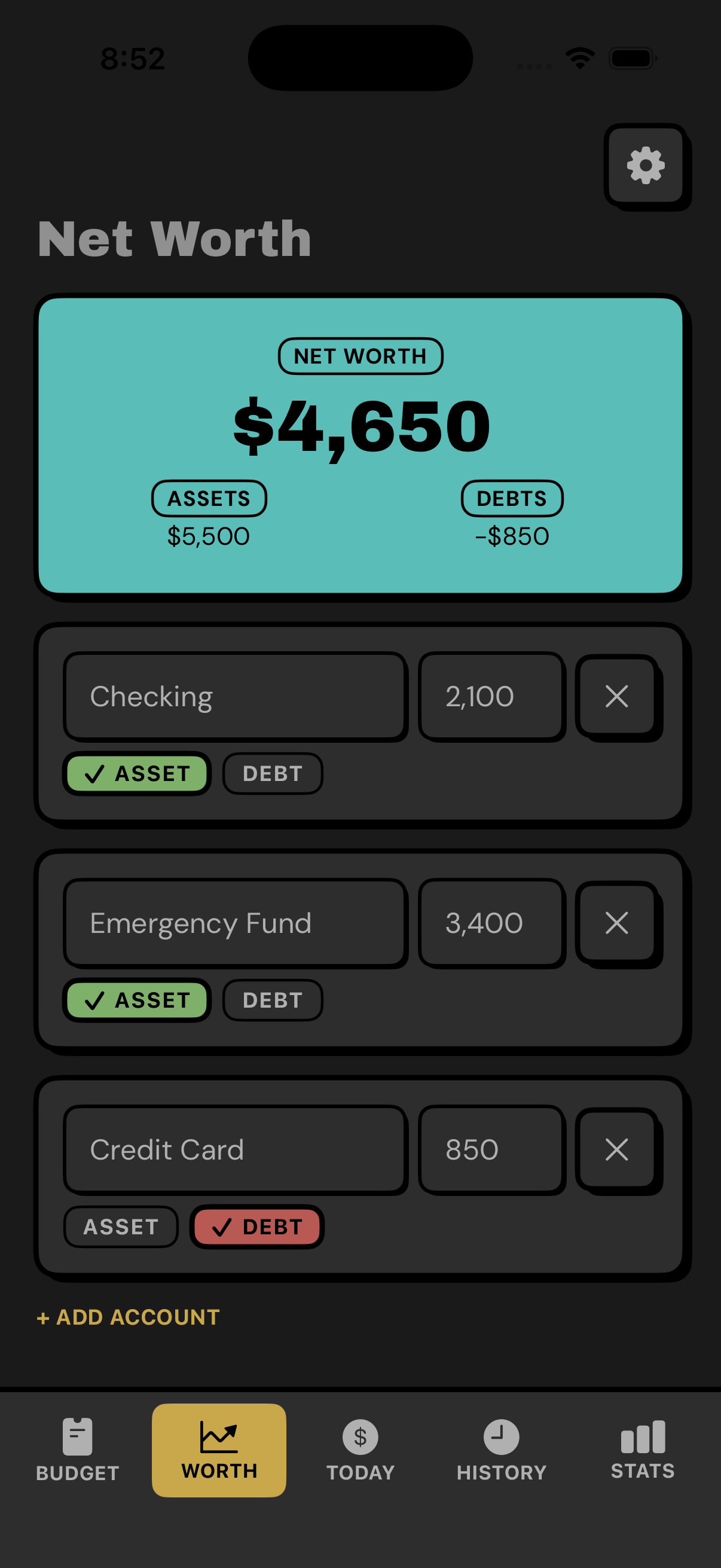
Add what you own—such as cash, savings, or other assets—and what you owe, including debts. Depo combines them into one total and shows how that number changes over time.
This matters because daily spending and long-term progress do not always move together in obvious ways. You might have a tighter daily number because you are sending more money to savings or paying down debt. The month can feel restrictive while your overall position is improving.
Net Worth gives that progress somewhere to appear.
It can also reveal a problem that income alone hides. A strong paycheck does not necessarily mean a strong financial position if debts are growing at the same time. Seeing assets and debts together gives you a more honest picture.
You do not need to update net worth after every tiny market change. A regular monthly check is enough for most people to see the direction clearly.
Put your number on the Home Screen
The Home Screen widget keeps your safe-to-spend number visible without requiring you to open Depo.
That small reduction in effort matters. A useful number should be easier to check than your bank balance. Seeing it before you order food, walk into a store, or make an online purchase can interrupt autopilot long enough for you to make a deliberate choice.
The widget is especially helpful if you have ADHD, struggle to remember financial routines, or tend to avoid money apps once they disappear into a folder.
Keep your budget available with iCloud sync
iCloud sync keeps Depo current across your devices. Your budget, history, and wider financial picture remain available without creating a separate Depo account or handing the app a bank login.
Sync removes another small reason to delay tracking: the useful version of your budget is with you on the device you are using.
Import, export, and keep control of your information
Import and export make it easier to bring information into Depo or take your records with you.
Export can be useful when you want a separate backup, want to examine your history elsewhere, or simply prefer knowing your information is portable. Import reduces the work of rebuilding compatible data manually.
Depo is intentionally not a bank-connected aggregator. According to its App Store privacy disclosure, the app does not collect your data. You enter the financial information needed for your own budget, and the app does not ask for your banking credentials. For more on the reasoning, see how to budget without linking your bank account.
Use Face ID when privacy matters
Money is personal even when the app does not contain a bank login.
Face ID lock helps prevent someone with access to your phone from casually opening your budget, spending history, assets, or debts. Turn it on if you share your device or simply want an extra layer between your financial picture and everyone else.
Make Depo look like something you want to open
Custom app icons and appearance options are not financial calculations, but they still support the habit.
A budget only helps when you are willing to look at it. Choosing the version of Depo that feels most like yours makes the app easier to keep visible and return to. The bold design, color coding, and clear hierarchy are there to make the truth readable—not to make finance look like homework.
A realistic Depo routine
You do not need to think about personal finance all day. A sustainable routine can be very small.
At the start of the month: about 10 minutes
- Enter the income you can realistically count on.
- Review rent, bills, debt payments, and other essentials.
- Choose a savings amount you can protect.
- Check the first safe-to-spend number.
During the day: a few seconds
- Check your number before optional spending.
- Add purchases as they happen or later the same day.
- Let tomorrow adjust without trying to "fix" the app.
Before a large purchase: about 30 seconds
- Open Can I afford it?
- Enter the rounded purchase amount.
- Look at the effect on the rest of the month.
- Decide whether that tradeoff works for you.
Once a week: a couple of minutes
- Check History for anything missing.
- Look at Stats for a developing pattern.
- Adjust an incorrect plan amount if reality has changed.
At the end of the month: five minutes
- Read the Monthly Recap.
- Update your Net Worth if you track it.
- Carry useful lessons into the next month.
That is enough. Depo is meant to reduce the amount of time you spend managing a budget, not give you a new administrative hobby.
Common mistakes that make the number less useful
Treating your bank balance as income
Do not count money twice or include amounts that are already reserved elsewhere. Depo needs the money available for the plan, not an impressive-looking total.
Budgeting uncertain income before it arrives
If freelance work, tips, commissions, or extra shifts are unpredictable, build a conservative plan. Add the upside when it becomes real.
Forgetting irregular essentials
Annual renewals, quarterly bills, gifts, travel, school expenses, and repairs still consume money even though they do not happen every month. When you know one is coming, protect it instead of letting it surprise the daily number later. See how to budget for annual and irregular expenses.
Setting savings so high that the plan cannot survive
Savings should be protected, but the rest of the month still has to work. An impossible target will keep the number red and tempt you to ignore the app. Start with something honest and increase it when the plan supports it.
Waiting too long to enter spending
Depo can only show your current situation when it knows what happened. Logging takes a few seconds; doing it while the purchase is fresh keeps the number trustworthy.
Trying to make every category perfect
Use categories for insight, not as a test. If deciding between two labels creates friction, choose Other and move on.
Hiding a bad day
Do not delete a real expense because it makes the number uncomfortable. The adjustment is the feature working correctly.
Who Depo works best for
Depo is built for people who want clarity without turning personal finance into a project.
It can be especially useful for:
- People who hate traditional budgeting
- People who have started and abandoned other budget apps
- People with ADHD or executive dysfunction
- Freelancers, gig workers, and people with irregular income
- People paying off debt who need to manage what remains afterward
- People who avoid checking their bank balance
- People who want to save without maintaining a complicated system
- People who want a private, manual budget without bank linking
You do not need to become a "budget person." You only need to be willing to look at one honest number and update it when you spend.
The real goal is not to spend as little as possible
Depo is not designed to make the smallest number win.
The goal is to understand what your money can do.
Sometimes that means deciding not to buy something. Sometimes it means seeing that dinner, a trip, or a ticket genuinely fits—and enjoying it without the background fear that you forgot a bill.
Savings improve because they are protected before flexible spending begins. Awareness improves because you record purchases yourself. Daily decisions become easier because the entire month is translated into one number you can use right now. Stats, recaps, and net worth then turn those small decisions into a wider picture of where you are going.
You do not need perfect behavior. You need a system that keeps telling the truth after real life happens.
That is Depo:
Income in. Essentials and savings aside. One honest number for today.
Download Depo on the App Store and face your number.
No bank login. No spreadsheet. No shame. No BS.
Frequently asked questions
Does Depo connect to my bank account?
No. You enter income, essentials, savings, and purchases manually. This is intentional: it protects privacy and creates a brief moment of awareness when you spend.
Why does Depo round everything?
Depo uses whole numbers because it is built for quick, practical decisions rather than accounting-level reconciliation. For example, $0.56 becomes $1 and $1.37 becomes $1. Whole numbers are faster to enter, easier to read, and easier to remember.
Do I have to use categories?
No. Categories are useful for later spending breakdowns, but a purchase can remain in Other. Keeping your daily number current matters more than perfect classification.
What happens if I spend more than today's number?
The remaining days adjust. Depo does not reset the month or treat the purchase as a failure. It updates what is safe from that point forward.
What happens if I spend less?
The unspent money stays in the plan and increases the flexibility available over the remaining days.
Can Depo work with irregular income?
Yes. Use income you can realistically count on, start conservatively, and update the plan when additional money arrives. The daily number is recalculated from your current reality rather than assuming every month is identical.
Is a negative number bad?
It is not a judgment, but it is a warning worth using. It means current commitments and spending exceed the money available for the remaining time. Reviewing the plan early gives you more options than discovering the gap later.
Is Depo only a daily spending tracker?
No. The daily number is the center of the app, but Depo also includes bill planning, categories, History, Can I afford it?, Stats and trends, Monthly Recap, Net Worth tracking, Home Screen widgets, iCloud sync, import/export, Face ID lock, custom appearance, personal bests, and longer-term comparisons.
How much time does Depo take?
The first monthly setup can take about ten minutes. Most daily check-ins and expense entries take only a few seconds. Weekly and monthly reviews are optional and can remain brief.
Keep reading
How to Budget Without Linking Your Bank Account
You can budget without giving an app access to your bank. Compare manual methods, their trade-offs, and the questions worth asking before connecting.
Budgeting for people who hate spreadsheets
You do not need a spreadsheet to budget. You need one number. Here is how to stop building systems you will abandon in a week.
How to Budget After Losing a Job: A 30-Day Cash Plan
A job loss makes the old budget irrelevant. Build a 30-day cash plan from what is real, protect urgent bills, and find official help before costs pile up.